Quotations மேலாண்மை
Hbl-இன் simpleBillBook-இல் உள்ள Quotations, actual sales நடைபெறுவதற்கு முன் potential customers-க்கு formal price estimates உருவாக்க அனுமதிக்கிறது. இது business development, customer communication மற்றும் sales planning-க்கு உதவுகிறது. Customers தங்களின் orders-ஐ confirm செய்த பிறகு quotations-ஐ sales invoices ஆக மாற்றலாம்.
Quotations Overview
Quotations பல முக்கியமான business செயல்பாடுகளுக்கு பயன்படுகிறது:
- Price Estimation: customers-க்கு formal price quotes வழங்க
- Sales Proposals: product/service offerings-ஐ தொழில்முறை முறையில் வழங்க
- Order Reservations: குறிப்பிட்ட காலத்திற்கு prices hold செய்ய
- Negotiation Basis: price discussions-க்கு ஆரம்ப நிலையாக செயல்பட
- Conversion Potential: actual invoices ஆக எளிதில் மாற்றலாம்
Quotations பார்வையிடுதல்
அனைத்து quotations-ஐ பார்க்க:
- முக்கிய sidebar-இல் இருந்து Manage Sales → Quotations என்பதற்கு செல்லவும்
- அனைத்து quotations-ஐ காட்டும் ஒரு table காணப்படும் (quotations இல்லையெனில் empty ஆக இருக்கும்)
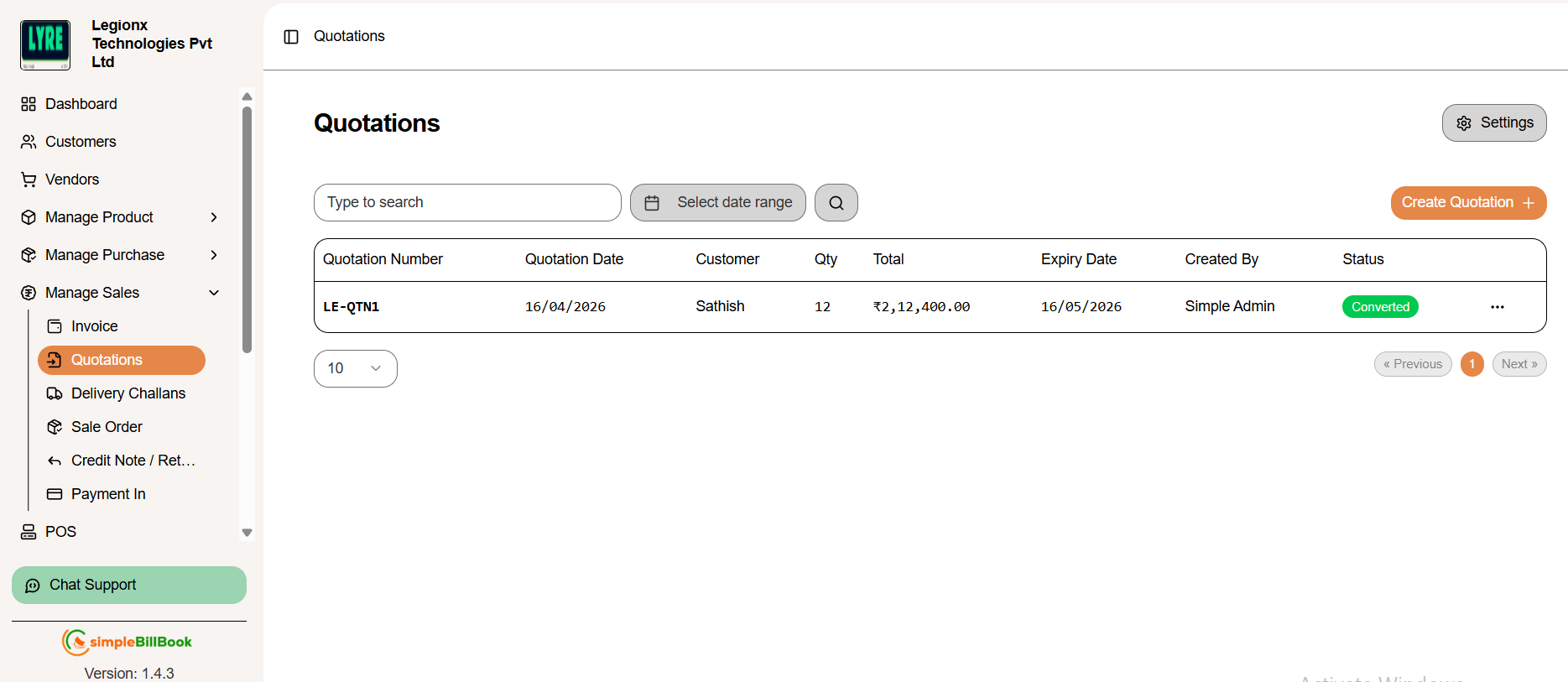 படம் 1: quotation management interface காட்டும் quotations list page
Quotation Table Columns:
Quotation Information:
- Quotation Number: தனித்துவமான identifier (உதாரணம்: QTN1, QTN2)
- Quotation Date: quote உருவாக்கப்பட்ட தேதி
- Customer: customer பெயர்
- Qty: quoted items-இன் மொத்த quantity
Financial and Status Details:
- Total: மொத்த quoted amount
- Expiry Date: quotation-க்கான validity period
- Created By: quotation உருவாக்கிய user
- Status: தற்போதைய status (Draft, Sent, Accepted, Expired, Converted)
முக்கிய Interface Elements:
- Create Quotation +: புதிய quotation உருவாக்க button
- Type to search: ஏற்கனவே உள்ள quotations-ஐ search செய்யும் வசதி
- Select Date Range: தேர்வு செய்யப்பட்ட date period அடிப்படையில் quotations filter செய்ய
- Pagination: navigation controls (உதாரணம்: ஒரு page-க்கு "10" items)
- Empty State: quotations இல்லையெனில் "No results" message காட்டப்படும்
புதிய Quotation உருவாக்குதல்
படி 1: Quotation Creation அணுகுதல்
quotations list page-இல் இருந்து Create Quotation + button-ஐ click செய்யவும்.
படி 2: Quotation Details நிரப்புதல்
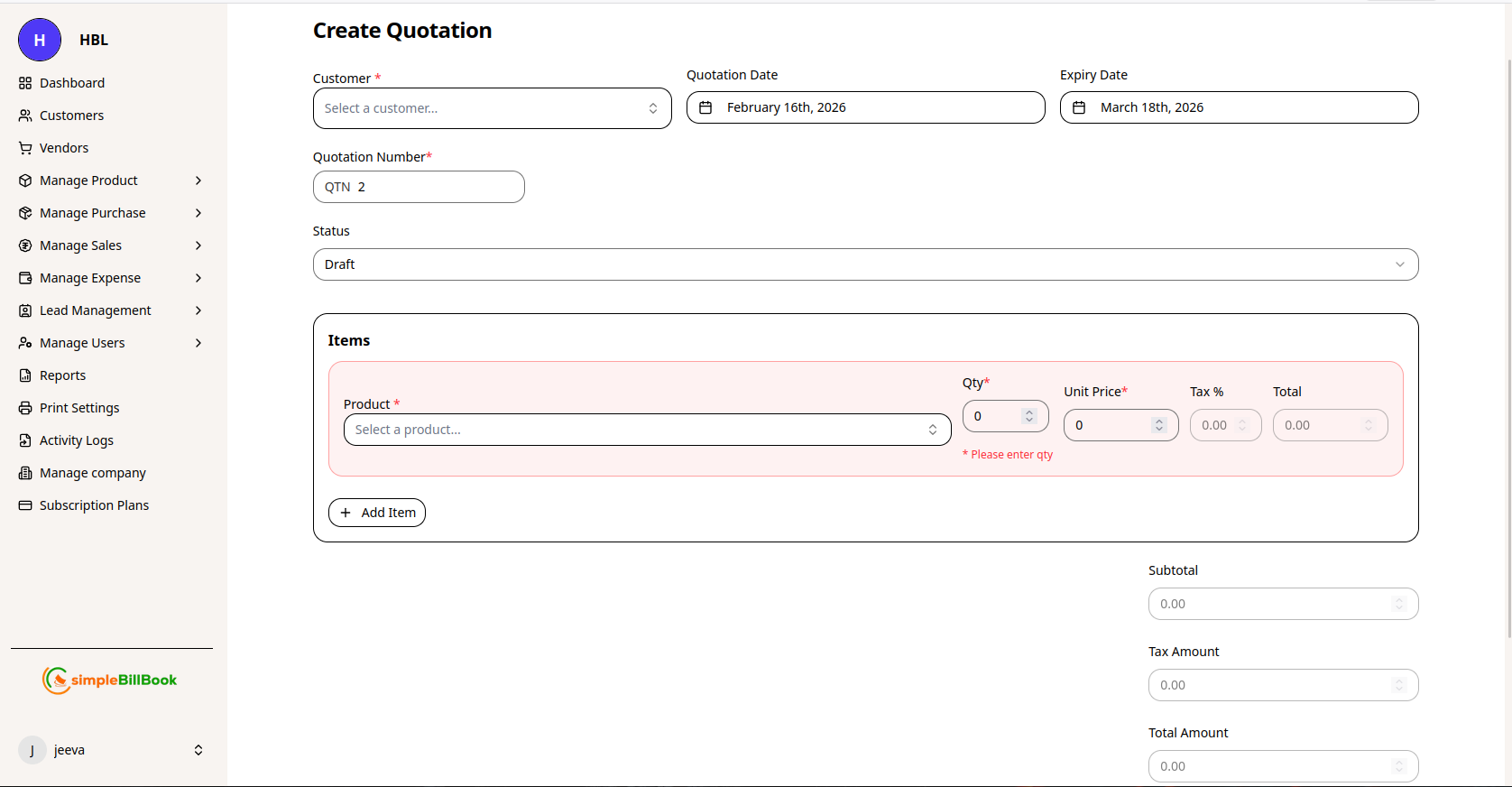 படம் 2: புதிய quotations உருவாக்கும் form
Header Information:
- Customer*: dropdown-இல் இருந்து customer தேர்வு செய்யவும் (required)
- Quotation Date: தற்போதைய தேதியுடன் auto-filled ஆகும் (editable)
- Expiry Date: quotation-க்கான validity period
- Quotation Number: settings அடிப்படையில் auto-generated
- Status: default ஆக "Draft" இருக்கும் (தேவையெனில் "Sent" ஆக மாற்றலாம்)
Item Selection:
- inventory dropdown-இல் இருந்து Product தேர்வு செய்யவும்
- Qty: quotation-இல் குறிப்பிடப்படும் quantity
- Unit Price: ஒரு unit-க்கான price (edit செய்யலாம்)
- Tax %: பொருந்தும் tax rate (இருந்தால்)
- Total: line item total (auto-calculated: Qty × Unit Price)
- மேலும் products சேர்க்க Add Item button-ஐ click செய்யவும்
Financial Summary:
- Subtotal: tax-க்கு முன் அனைத்து item totals-இன் மொத்தம்
- Tax Amount: tax rates அடிப்படையில் கணக்கிடப்பட்ட tax
- Total Amount: taxes உட்பட இறுதி quoted amount
படி 3: Quotation சேமித்தல்
- Create Quotation: save செய்து printable version generate செய்ய
- Cancel: quotation-ஐ discard செய்ய
Quotation Settings
Quotation Settings அணுகுதல்
quotations page-இல் இருந்து settings-ஐ அணுகவும் (பொதுவாக gear icon அல்லது Settings menu மூலம்).
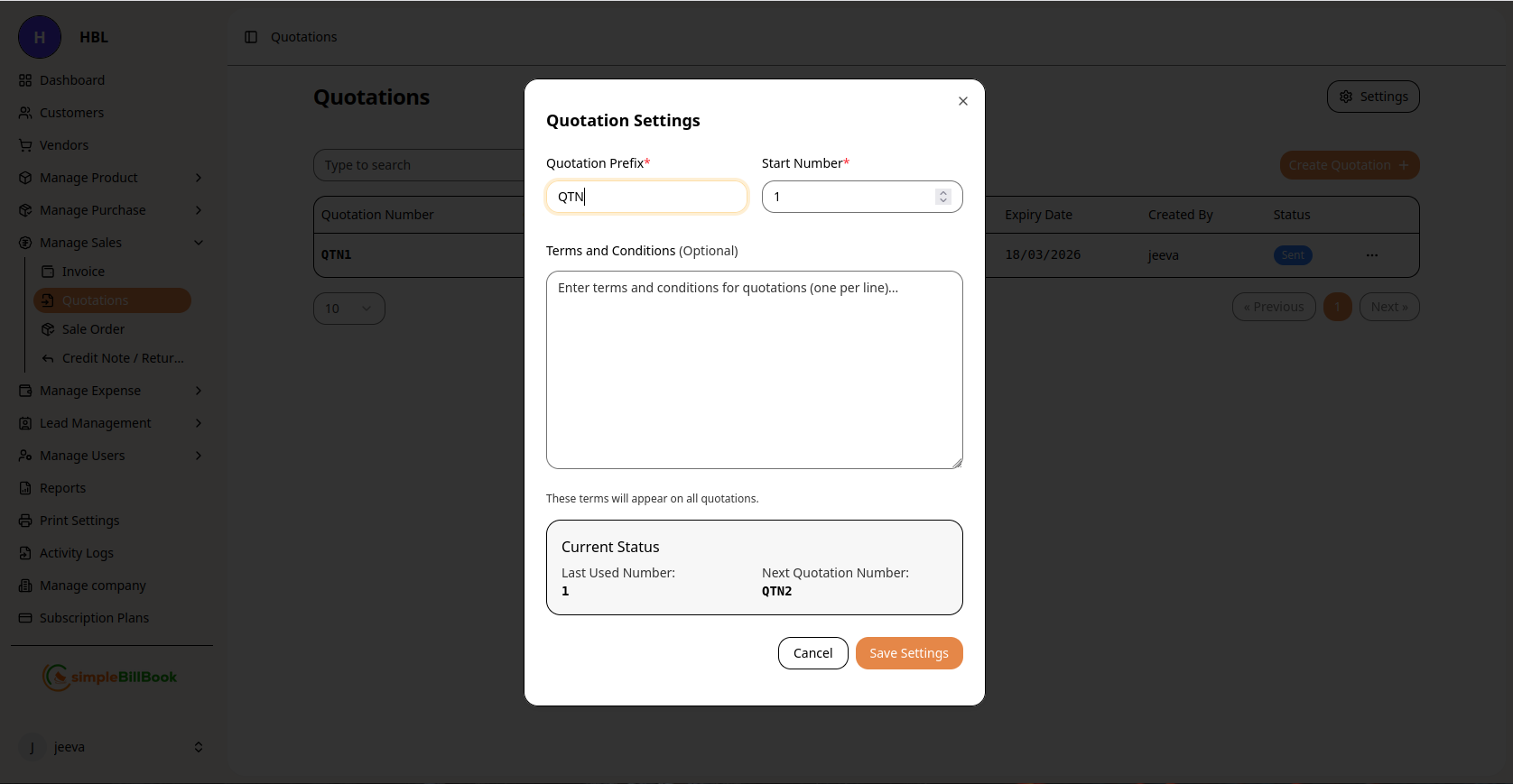 படம் 3: quotations-க்கான configuration settings
Configurable Settings:
Numbering System:
- Quotation Prefix*: custom prefix (default: "QTN")
- Start Number*: ஆரம்ப sequence number (required)
- Last Used Number: கடைசியாக generate செய்யப்பட்ட number-ஐ system track செய்யும்
- Next Quotation Number: அடுத்த auto-generated number preview
Terms and Conditions:
- Default Terms: standard terms உள்ளிடவும் (ஒவ்வொரு line-க்கும் ஒன்று)
- Validity Period: default expiry duration
- Payment Terms: quotations-க்கான standard payment conditions
- Special Conditions: quotation-specific terms
Display Settings:
- Default Expiry Days: quotations valid ஆக இருக்கும் நாட்கள்
- Tax Configuration: quotations-க்கான default tax settings
- Template Selection: quotation layout மற்றும் design
Settings சேமித்தல்:
- மாற்றங்களை apply செய்ய Save Settings button-ஐ click செய்யவும்
- modifications-ஐ discard செய்ய Cancel பயன்படுத்தவும்
- settings அனைத்து எதிர்கால quotations-க்கும் பொருந்தும்
Quotation Workflow
வழக்கமான Quotation Lifecycle:
1. Creation Stage (Status: Draft)
- quotation items மற்றும் pricing உடன் உருவாக்கப்படும்
- edit மற்றும் modify செய்யலாம்
- customer-க்கு இன்னும் அனுப்பப்படவில்லை
2. Review Stage (Status: Pending Review)
- accuracy-க்கான internal review
- தேவையெனில் manager approval
- pricing validation
3. Communication Stage (Status: Sent)
- customer consideration-க்காக அனுப்பப்படும்
- customer modifications கேட்கலாம்
- follow-up communication நடைபெறும்
4. Negotiation Stage (Status: Negotiating)
- price அல்லது terms negotiation
- பல quote revisions உருவாகலாம்
- changes documentation செய்யப்படும்
5. Acceptance Stage (Status: Accepted)
- customer quotation-ஐ accept செய்கிறார்
- order fulfillment-க்கு தயாராகும்
- invoice ஆக மாற்றலாம்
6. Conversion Stage (Status: Converted)
- sales invoice ஆக மாற்றப்படும்
- inventory reserve அல்லது allocate செய்யப்படும்
- payment processing ஆரம்பிக்கப்படும்
7. Expiration Stage (Status: Expired)
- validity period முடிவடைந்தது
- customer நேரத்தில் accept செய்யவில்லை
- தேவையெனில் renew செய்யலாம்
8. Rejection Stage (Status: Rejected)
- customer quote-ஐ நிராகரித்தார்
- analysis-க்காக காரணம் பதிவு செய்யப்படும்
- case close செய்யப்படும்
Quotations வகைகள்
1. Standard Price Quotations
- Purpose: standard products-க்கான pricing வழங்க
- Features: fixed prices, standard terms
- Validity: பொதுவாக 30-60 நாட்கள்
2. Project Quotations
- Purpose: complex projects அல்லது services-க்கான quote
- Features: detailed breakdown, milestones
- Validity: project-specific timeframe
3. Bulk Order Quotations
- Purpose: பெரிய quantity orders-க்கான quotes
- Features: volume discounts, special terms
- Validity: குறைந்த validity இருக்கலாம்
4. Custom Product Quotations
- Purpose: customized products-க்கான quotes
- Features: specifications, lead times, special pricing
- Validity: specifications மாறும் வரை
5. Service Quotations
- Purpose: products-க்கு பதிலாக services-க்கான quotes
- Features: hourly rates, service descriptions
- Validity: service availability period
Quotation Management-க்கான சிறந்த நடைமுறைகள்
திறமையான Quotations உருவாக்குதல்:
- Professional Formatting: தெளிவான மற்றும் professional layout பயன்படுத்தவும்
- Detailed Descriptions: product specifications மற்றும் features சேர்க்கவும்
- Clear Pricing: unit prices, quantities மற்றும் totals தெளிவாக காட்டவும்
- Validity Period: expiry date எப்போதும் சேர்க்கவும்
- Contact Information: பல contact options வழங்கவும்
Customer Communication:
- Prompt Submission: request வந்தவுடன் quotations விரைவாக அனுப்பவும்
- Professional Presentation: professional cover note உடன் அனுப்பவும்
- Follow-up System: quote status track செய்து follow up செய்யவும்
- Flexibility: terms negotiate செய்ய தயாராக இருக்கவும்
Internal Processes:
- Approval Workflow: முக்கிய quotations-க்கு approval process அமைக்கவும்
- Template Consistency: uniformity-க்காக standard templates பயன்படுத்தவும்
- Database Maintenance: product மற்றும் price information current ஆக வைத்திருக்கவும்
- Performance Tracking: quote conversion rates monitor செய்யவும்
Validity Management:
- Clear Expiry Dates: validity period-ஐ எப்போதும் குறிப்பிடவும்
- Renewal Process: expire ஆகும் quotes-க்கான process வைத்திருக்கவும்
- Price Protection: validity-க்குள் quoted prices-ஐ honor செய்யவும்
- Communication of Changes: expire ஆகும் quotes பற்றி customers-க்கு தெரிவிக்கவும்
Quotations-ஐ Invoices ஆக மாற்றுதல்
Conversion Process:
- list-இல் accepted quotation-ஐ கண்டுபிடிக்கவும்
- Convert to Invoice அல்லது அதற்கு இணையான action-ஐ click செய்யவும்
- system quotation details உடன் புதிய invoice உருவாக்கும்
- quotation status "Converted" ஆக update செய்யப்படும்
- inventory reserve அல்லது allocate செய்யப்படும்
Partial Conversion:
- quotation-இல் இருந்து தேர்ந்தெடுத்த items மட்டும் convert செய்யவும்
- மீதமுள்ள items quotation-இல் இருக்கும்
- phased deliveries-க்கு பயன்படும்
- quote relationship maintain செய்யப்படும்
Conversion நேரத்தில் Price Adjustments:
- final prices conversion நேரத்தில் மாற்றப்படலாம்
- price changes-க்கான காரணங்களை பதிவு செய்யவும்
- changes-க்கான audit trail maintain செய்யவும்
- முக்கியமான மாற்றங்கள் இருந்தால் customer confirmation பெறவும்
மற்ற Modules உடன் Integration
Customer Management:
- Quote History: ஒவ்வொரு customer-க்கும் அனுப்பப்பட்ட quotes track செய்யப்படும்
- Conversion Tracking: quote-to-invoice conversion rates monitor செய்யப்படும்
- Customer Preferences: customer response patterns பதிவு செய்யப்படும்
Inventory Management:
- Stock Availability: quote creation போது stock check செய்யலாம்
- Reservation Option: quoted items-க்கு stock reserve செய்யலாம்
- Lead Time Information: availability dates காட்டப்படும்
Sales Management:
- Pipeline Tracking: quotes sales pipeline-ஐ பிரதிநிதித்துவப்படுத்தும்
- Forecasting: future sales predict செய்ய உதவும்
- Performance Analysis: quote success rates track செய்யப்படும்
Product Management:
- Price Testing: புதிய prices quotations மூலம் test செய்யலாம்
- Product Interest: products மீது customer interest அளவிடப்படும்
- Customization Tracking: custom product requests பதிவு செய்யப்படும்
பொதுவான சூழல்கள் மற்றும் தீர்வுகள்
Scenario 1: Customer பல Revisions கேட்கிறார்
Solution:
- updated version number உடன் புதிய revision உருவாக்கவும்
- previous version-இலிருந்து செய்யப்பட்ட changes பதிவு செய்யவும்
- changes பற்றிய அனைத்து communication-ஐ track செய்யவும்
- free revisions எண்ணிக்கைக்கு வரம்பு அமைப்பதை பரிசீலிக்கவும்
Scenario 2: Quote அனுப்பிய பிறகு Price Changes
Solution:
- updated prices உடன் புதிய quote உருவாக்கவும்
- price change காரணத்தை customer-க்கு தெரிவிக்கவும்
- validity period-இல் இருந்தால் original quote-ஐ honor செய்யவும்
- supplier price increases இருந்தால் பதிவு செய்யவும்
Scenario 3: Quotation-இல் இருந்து Partial Order
Solution:
- order செய்யப்பட்ட items மட்டும் invoice ஆக convert செய்யவும்
- மீதமுள்ள items-க்காக quotation update செய்யவும்
- தேவையெனில் validity adjust செய்யவும்
- partial acceptance பதிவு செய்யவும்
Scenario 4: Competitor Quote Comparison
Solution:
- competitor pricing தெரிந்தால் பகுப்பாய்வு செய்யவும்
- value differentiation highlight செய்யவும்
- strategic pricing adjustments பரிசீலிக்கவும்
- service/quality advantages மீது கவனம் செலுத்தவும்
Scenario 5: Expired Quote Revival
Solution:
- prices இன்னும் valid ஆக உள்ளதா check செய்யவும்
- current pricing உடன் புதிய quote உருவாக்கவும்
- original quote number reference செய்யவும்
- புதிய quote காரணத்தை தெரிவிக்கவும்
Reports and Analytics
கிடைக்கக்கூடிய Quotation Reports:
- Open Quotations: status அடிப்படையிலான active quotations
- Quote Conversion Rate: sales ஆக convert ஆன quotations சதவீதம்
- Quotation Aging: quotations pending ஆக இருக்கும் கால அளவு
- Customer Quote Analysis: customer மற்றும் response அடிப்படையிலான quotes
- Product Quote Analysis: அதிகமாக quoted செய்யப்பட்ட products
- Validity Expiry Report: விரைவில் expire ஆகும் quotations
கண்காணிக்க வேண்டிய முக்கிய Metrics:
- Conversion Rate: sales ஆக மாறும் quotes சதவீதம்
- Response Time: quotations வழங்க எடுக்கப்படும் சராசரி நேரம்
- Quote Value: quotations-இன் சராசரி value
- Expiry Rate: convert ஆகாமல் expire ஆகும் quotes சதவீதம்
- Revision Frequency: ஒரு quote-க்கு சராசரி revisions