Purchase Order மேலாண்மை
SimpleBillBook-இல் உள்ள Purchase Orders (POs), actual purchase செய்வதற்கு முன் vendors-இலிருந்து goods அல்லது services-ஐ முறையாக request செய்ய அனுமதிக்கிறது. இது planning, budgeting மற்றும் procurement requests-க்கான சரியான documentation-ஐ உறுதி செய்ய உதவுகிறது.
Purchase Orders Overview
Purchase Orders, உங்கள் business மற்றும் vendors இடையிலான அதிகாரப்பூர்வ ஒப்பந்தங்களாக செயல்படுகிறது. இதில் குறிப்பிடப்படுவது:
- தேவையான products/services
- quantities மற்றும் prices
- delivery dates மற்றும் terms
- payment conditions
Purchase Orders பார்வையிடுதல்
அனைத்து purchase orders-ஐ பார்க்க:
- முக்கிய sidebar-இல் இருந்து Manage Purchase → Purchase Order என்பதற்கு செல்லவும்
- அனைத்து purchase orders மற்றும் அவற்றின் தற்போதைய status-ஐ கொண்ட table காணப்படும்
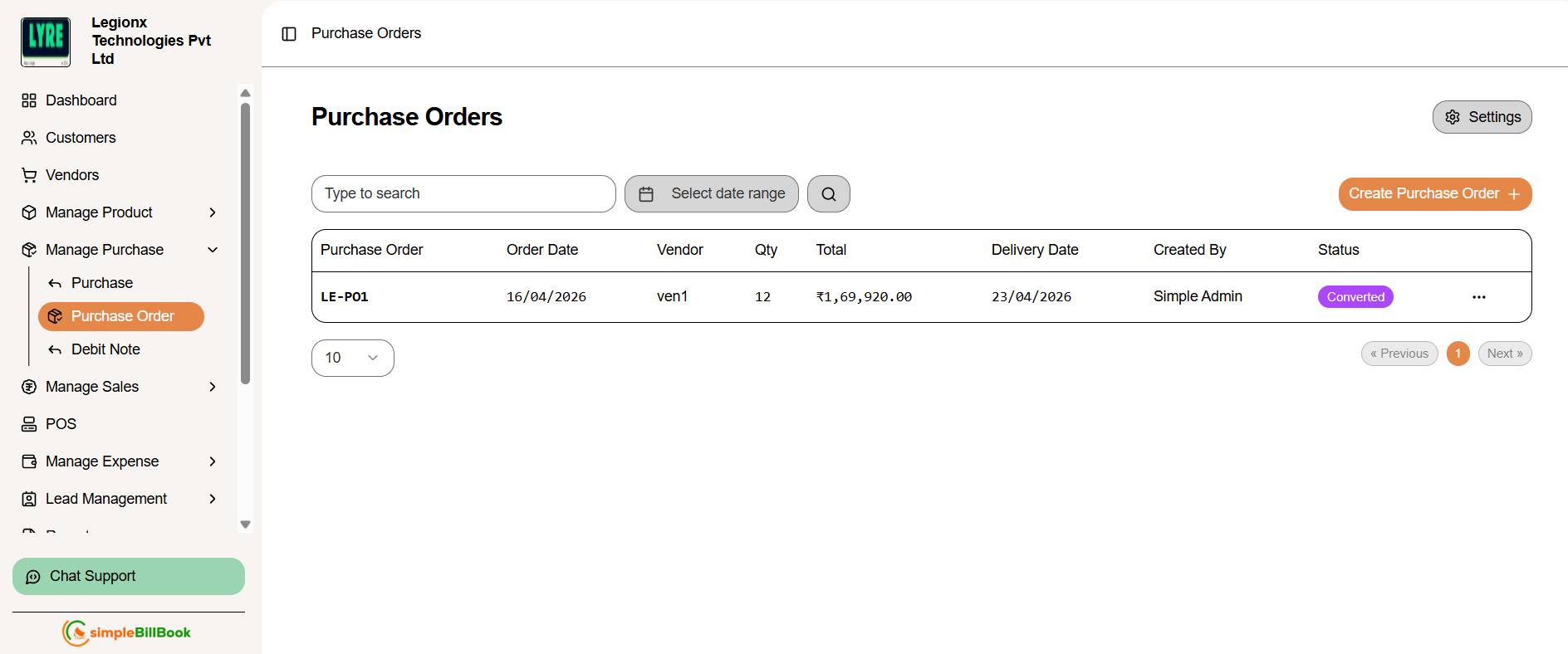 படம் 1: status மற்றும் details உடன் அனைத்து purchase orders-ஐ காட்டும் list
Purchase Order Table Columns:
Order Information:
- Purchase Order: தனித்துவமான PO number (உதாரணம்: PO1000)
- Order Date: PO உருவாக்கப்பட்ட தேதி
- Vendor: vendor பெயர்
- Qty: order செய்யப்பட்ட items-இன் மொத்த quantity
Financial and Delivery Details:
- Total: மொத்த order value
- Delivery Date: எதிர்பார்க்கப்படும் delivery date
- Created By: PO உருவாக்கிய user
- Status: தற்போதைய status (converted அல்லது pending)
கிடைக்கக்கூடிய முக்கிய Actions:
- Create Purchase Order: புதிய PO உருவாக்க
- Settings: PO numbering மற்றும் terms configure செய்ய
- Type to search: ஏற்கனவே உள்ள POs-ஐ filter/search செய்ய
- Edit/View: எந்த PO-ஐயும் click செய்து edit அல்லது view செய்ய
புதிய Purchase Order உருவாக்குதல்
படி 1: PO Creation அணுகுதல்
POs list page-இல் இருந்து Create Purchase Order button-ஐ click செய்யவும்.
படி 2: Purchase Order Details நிரப்புதல்
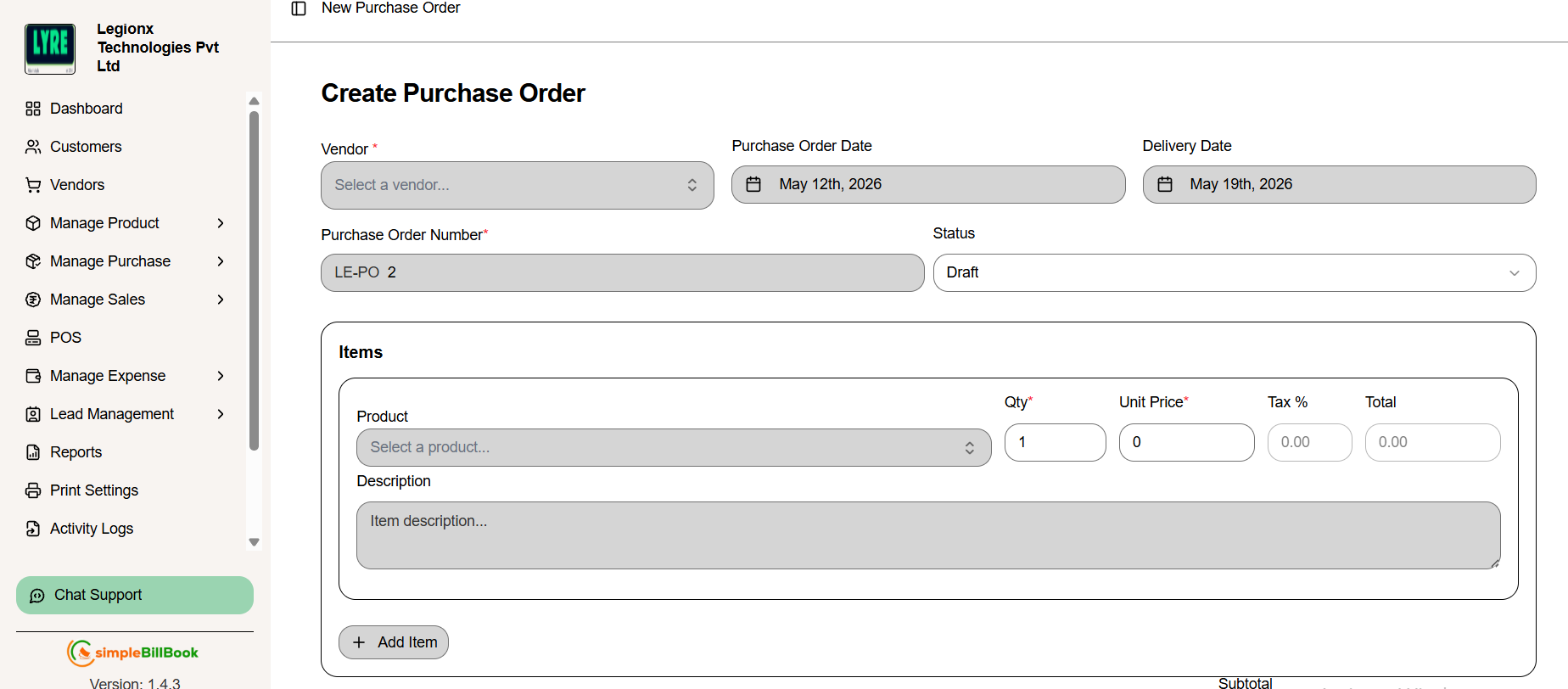 படம் 2: புதிய purchase orders உருவாக்கும் form
Header Information:
- Vendor: dropdown-இல் இருந்து vendor தேர்வு செய்யவும் (required)
- Purchase Order Date: தற்போதைய தேதியுடன் auto-fill ஆகும் (editable)
- Delivery Date: vendor-இலிருந்து எதிர்பார்க்கப்படும் delivery date
- PO Number: settings அடிப்படையில் auto-generated (உதாரணம்: LE-PO 2)
- Status: default ஆக "Draft" இருக்கும் (தேவையெனில் "Sent", "Accepted" அல்லது "Rejected" ஆக மாற்றலாம்)
Item Selection:
- order-இல் products சேர்க்க + Add Item button-ஐ click செய்யவும்
- dropdown-இல் இருந்து Product தேர்வு செய்யவும்
- quantity, unit price மற்றும் item-specific notes உள்ளிடவும்
- தேவைக்கேற்ப பல items சேர்க்கவும்
Financial Summary:
- Subtotal: tax-க்கு முன் அனைத்து item values-இன் மொத்தம்
- Tax Amount: tax settings அடிப்படையில் கணக்கிடப்பட்ட tax
- Total Amount: taxes உட்பட இறுதி amount
படி 3: Purchase Order சேமித்தல்
- Create purchase order: பின்னர் edit செய்ய save செய்யவும்
Purchase Order Actions
purchase orders உருவாக்கப்பட்ட பிறகு, பல்வேறு actions செய்ய முடியும்:
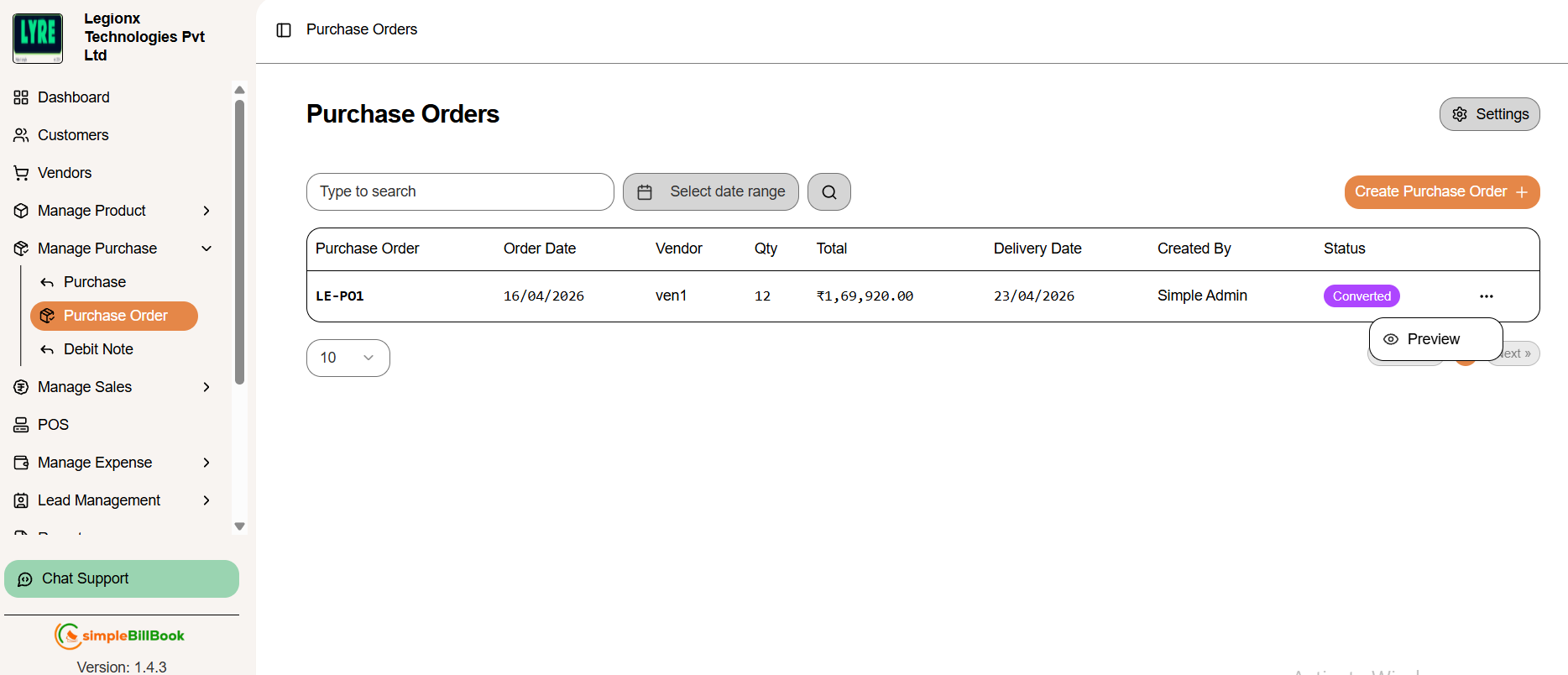 படம் 3: action buttons உடன் purchase orders list
Available Actions
| Action | Description |
|---|---|
| Preview | purchase order-இன் printable version-ஐ பார்க்க |
Example Purchase Orders
| PO Number | Date | Vendor | Qty | Total | Delivery Date | Status |
|---|---|---|---|---|---|---|
| PO1001 | 17/02/2026 | SWT Electronics | 4 | ₹82,400.00 | 24/02/2026 | Sent |
| PO1000 | 17/02/2026 | SWT Electronics | 2 | ₹51,500.00 | 24/02/2026 | Draft |
Purchase Order Settings
PO Settings அணுகுதல்
purchase orders page-இல் இருந்து Settings button-ஐ click செய்து PO defaults configure செய்யவும்.
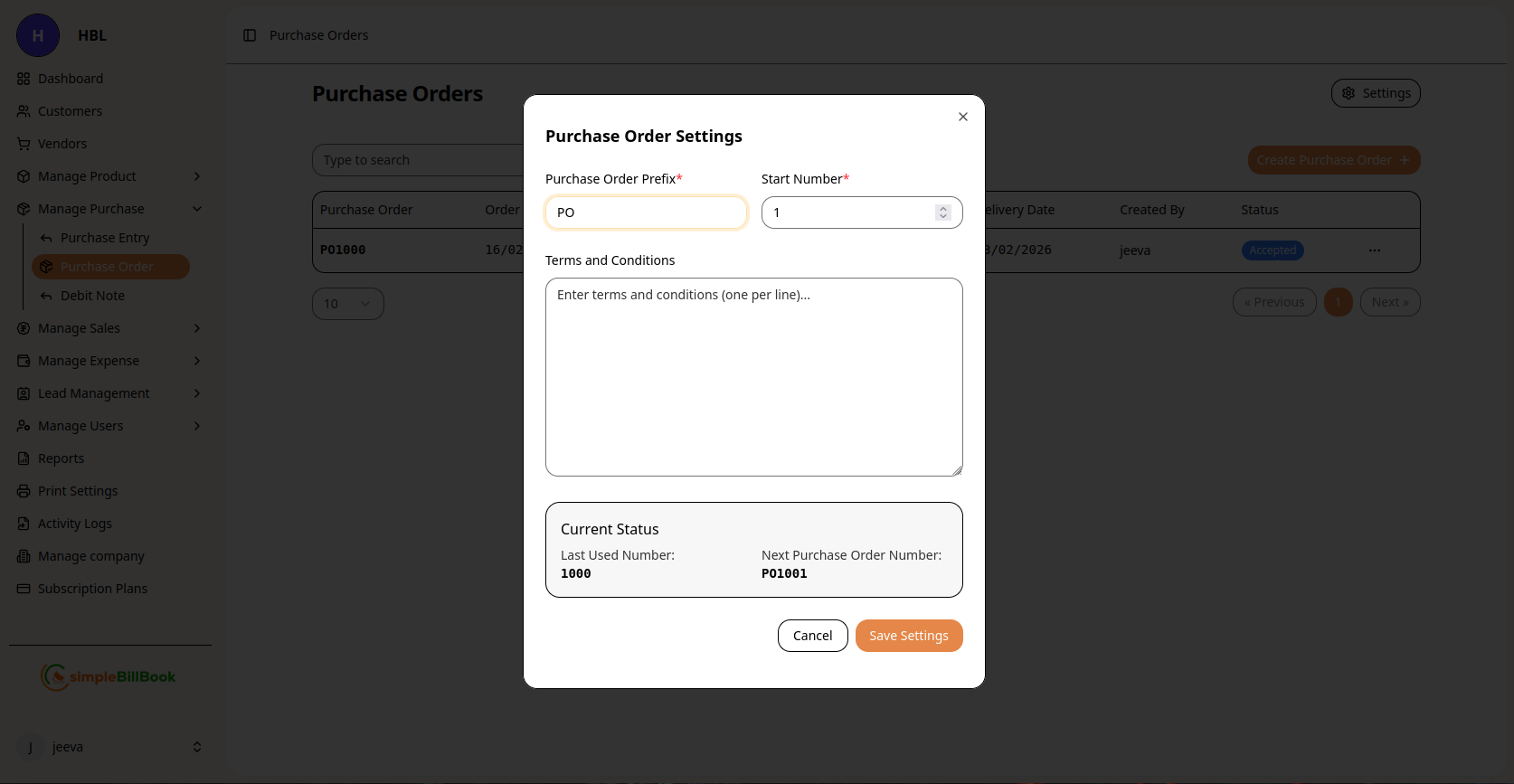 படம் 4: purchase orders-க்கான configuration settings
Configurable Settings:
Numbering System:
- Purchase Order Prefix: custom prefix (default: "PO")
- Start Number*: ஆரம்ப sequence number (required)
- Last Used Number: கடைசியாக generate செய்யப்பட்ட number-ஐ system track செய்யும்
- Next Purchase Order Number: அடுத்த auto-generated number preview
Terms and Conditions:
- Default Terms: standard terms உள்ளிடவும் (ஒவ்வொரு line-க்கும் ஒன்று)
- Payment Terms: default payment conditions
- Delivery Terms: standard delivery expectations
Other Settings:
- Default Status: புதிய POs-க்கான ஆரம்ப status
- Email Templates: automatic email notifications configure செய்ய
- Approval Workflow: approval requirements அமைக்க
Settings சேமித்தல்:
- மாற்றங்களை apply செய்ய Save Settings button-ஐ click செய்யவும்
- modifications-ஐ நிராகரிக்க Cancel பயன்படுத்தவும்
- settings அனைத்து எதிர்கால purchase orders-க்கும் பொருந்தும்
Purchase Order Workflow
வழக்கமான PO Lifecycle:
1. Draft Stage (Status: Draft)
- PO உருவாக்கப்பட்டுள்ளது ஆனால் இன்னும் finalize செய்யப்படவில்லை
- edit மற்றும் modify செய்யலாம்
- vendor-க்கு தெரியாது
2. Approval Stage (Status: Sent/Approved)
- quotation/confirmation-க்காக vendor-க்கு அனுப்பப்படும்
- internal approvals தேவைப்படலாம்
- vendor accept செய்யலாம் அல்லது changes முன்மொழியலாம்
3. Processing Stage (Status: Processing)
- vendor order-ஐ acknowledge செய்து process செய்கிறார்
- items shipment-க்கு தயாராகும்
- delivery schedule செய்யப்படும்
4. Delivery Stage (Status: Partially Received/Received)
- goods vendor-இலிருந்து பெறப்படும்
- quantity verification செய்யப்படும்
- quality checks நடத்தப்படும்
5. Completion Stage (Status: Completed/Closed)
- அனைத்து items-மும் பெறப்பட்டு accept செய்யப்பட்டுள்ளன
- Purchase Entry ஆக convert செய்யப்படும்
- payment processing-க்கு தயாராகும்
6. Cancellation (Status: Cancelled)
- fulfillment-க்கு முன் order cancel செய்யப்பட்டது
- காரணங்கள் பதிவு செய்யப்படும்
- vendor-க்கு அறிவிக்கப்படும்
Purchase Order Management-க்கான சிறந்த நடைமுறைகள்
திறமையான POs உருவாக்குதல்:
- Clear Descriptions: குறிப்பிட்ட product names மற்றும் codes பயன்படுத்தவும்
- Accurate Quantities: order quantities-ஐ இருமுறை சரிபார்க்கவும்
- Realistic Dates: சாத்தியமான delivery timelines அமைக்கவும்
- Complete Information: தேவையான vendor details அனைத்தும் சேர்க்கவும்
- Terms Clarity: payment மற்றும் delivery terms-ஐ தெளிவாக குறிப்பிடவும்
Vendor Communication:
- Send Promptly: approve செய்யப்பட்டவுடன் vendors-க்கு POs அனுப்பவும்
- Confirm Receipt: vendor PO பெற்றுள்ளாரா verify செய்யவும்
- Track Responses: vendor acknowledgments மற்றும் quotes monitor செய்யவும்
- Update Status: process முழுவதும் PO status update செய்து வைத்திருக்கவும்
Internal Coordination:
- Budget Alignment: POs budget constraints-க்கு உட்பட்டதா உறுதி செய்யவும்
- Department Approval: internal approval workflows பின்பற்றவும்
- Inventory Planning: expected deliveries-க்காக inventory team உடன் ஒருங்கிணைக்கவும்
- Receiving Preparation: expected shipments-க்காக receiving department-ஐ தயாராக்கவும்
PO-ஐ Purchase Entry ஆக மாற்றுதல்
Items பெறப்பட்டபோது:
- list-இல் PO-ஐ கண்டுபிடிக்கவும்
- Convert to Purchase action-ஐ click செய்யவும்
- received quantities-ஐ PO-உடன் verify செய்யவும்
- system தானாக Purchase Entry உருவாக்கும்
- PO status "Received" அல்லது "Completed" ஆக update செய்யப்படும்
Partial Receipts:
- உண்மையில் பெறப்பட்ட quantities-ஐ பதிவு செய்யவும்
- system received items-க்கு மட்டும் Purchase Entry உருவாக்கும்
- PO remaining balance-ஐ காட்டும்
- மீதமுள்ள items வந்தபின் PO update செய்யவும்
பொதுவான சூழல்கள் மற்றும் தீர்வுகள்
Scenario 1: PO அனுப்பிய பிறகு Price Changes
Solution:
- updated pricing-க்காக vendor-உடன் தொடர்பு கொள்ளவும்
- முக்கியமான மாற்றங்கள் இருந்தால் புதிய PO உருவாக்கவும்
- அல்லது adjusted prices உடன் Purchase Entry உருவாக்கவும்
- changes-க்கான காரணங்களை பதிவு செய்யவும்
Scenario 2: Vendor நேரத்திற்கு Delivery செய்ய முடியவில்லை
Solution:
- புதிய delivery date உடன் PO update செய்யவும்
- சாத்தியமானால் partial shipments பரிசீலிக்கவும்
- அவசர தேவைகளுக்கு alternative vendors மதிப்பாய்வு செய்யவும்
- vendor performance tracking-க்காக delays பதிவு செய்யவும்
Scenario 3: குறிப்பிட்டபடி இல்லாத Items
Solution:
- non-conforming items-ஐ accept செய்ய வேண்டாம்
- explanation உடன் vendor-க்கு திருப்பி அனுப்பவும்
- actual received items அடிப்படையில் PO update செய்யவும்
- replacement அல்லது credit கேட்கவும்
Scenario 4: ஒரு PO-க்கு Multiple Shipments
Solution:
- ஒவ்வொரு shipment-ஐ வந்தபோது receive செய்யவும்
- system partial receipts track செய்யும்
- PO cumulative received quantities-ஐ காட்டும்
- அனைத்து items-மும் வந்தபின் finalize செய்யவும்
மற்ற Modules உடன் Integration
Vendor Management:
- PO History: ஒவ்வொரு vendor உடனான அனைத்து POs-ஐ track செய்யும்
- Performance Metrics: vendor delivery reliability பகுப்பாய்வு செய்யும்
- Spending Analysis: vendor அடிப்படையிலான purchasing patterns monitor செய்யும்
Inventory Management:
- Expected Stock: POs எதிர்கால inventory additions-ஐ காட்டும்
- Reorder Planning: stock replenishment திட்டமிட உதவும்
- Budget Forecasting: inventory budget planning-க்கு உதவும்
Financial Planning:
- Commitment Tracking: POs எதிர்கால financial commitments-ஐ குறிக்கும்
- Cash Flow Projection: எதிர்கால payments forecast செய்ய உதவும்
- Budget Control: actual vs. planned purchases monitor செய்யும்
Purchase Management:
- Seamless Conversion: items பெறப்பட்டதும் POs Purchase Entries ஆக convert செய்யப்படும்
- Document Trail: முழுமையான procurement history பராமரிக்கப்படும்
- Variance Analysis: PO மற்றும் actual purchase details ஒப்பிடப்படும்
Reports and Analytics
கிடைக்கக்கூடிய PO Reports:
- Open POs Report: இன்னும் complete ஆகாத அனைத்து POs
- PO vs. Purchase Analysis: ordered vs. received ஒப்பீடு
- Vendor Performance: delivery timeliness மற்றும் accuracy
- Departmental Spending: department அல்லது category அடிப்படையிலான POs
- Pending Approvals: authorization காத்திருக்கும் POs
கண்காணிக்க வேண்டிய முக்கிய Metrics:
- PO Cycle Time: creation முதல் completion வரை
- Vendor Compliance: PO terms-க்கு vendor adherence
- Budget Variance: PO value vs. actual purchase cost
- Partial Delivery Rate: split shipments நிகழும் அடிக்கடி விகிதம்