Point of Sale (POS) மேலாண்மை
simpleBillBook-இல் உள்ள Point of Sale (POS) system, customer transactions-ஐ திறமையாக process செய்ய, billing-ஐ நிர்வகிக்க மற்றும் receipts உருவாக்க உதவுகிறது. இந்த guide, POS interface பயன்படுத்துதல், sales process செய்யுதல் மற்றும் receipt templates configure செய்வதை விளக்குகிறது.
POS Interface Overview
POS system-ஐ அணுக:
- முக்கிய sidebar-இல் இருந்து POS என்பதற்கு செல்லவும்
- customer transactions process செய்வதற்கான முக்கிய POS interface காணப்படும்
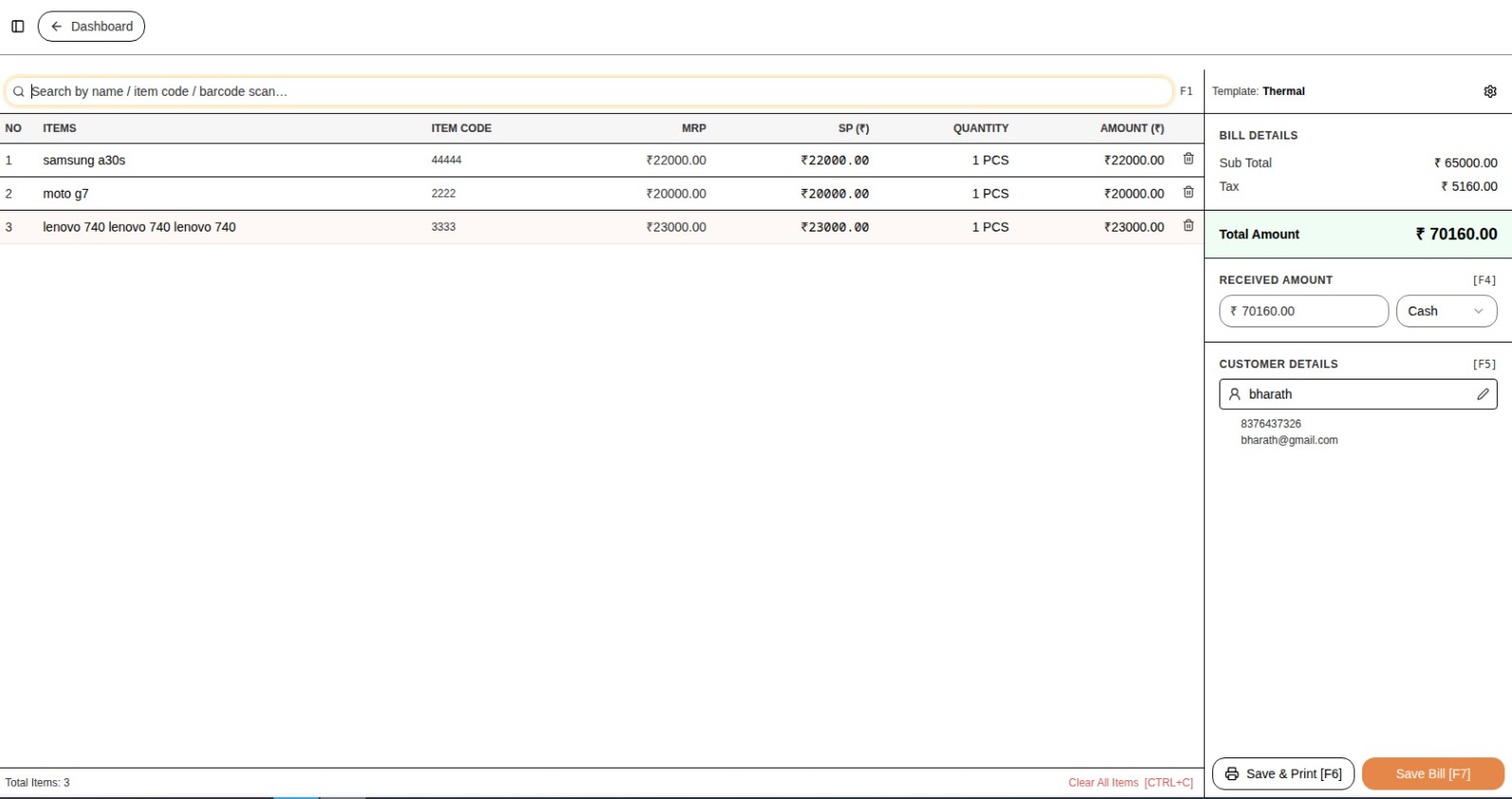 படம் 1: bill items மற்றும் customer details காட்டும் முக்கிய POS interface
Search Function
- Search Bar: பெயர் / item code / barcode scan மூலம் தேடவும்...
- product name, item code அல்லது barcode scan மூலம் products-ஐ விரைவாக கண்டுபிடிக்கலாம்
Bill Items Table
POS interface, தற்போதைய bill-இல் சேர்க்கப்பட்ட items பற்றிய விரிவான table-ஐ காட்டும்:
| NO | ITEMS | ITEM CODE | MRP | SP (₹) | QUANTITY | AMOUNT (₹) |
|---|---|---|---|---|---|---|
| 1 | samsung a30s | 44444 | ₹22000.00 | ₹22000.00 | 1 PCS | ₹22000.00 |
| 2 | moto g7 | 2222 | ₹20000.00 | ₹20000.00 | 1 PCS | ₹20000.00 |
| 3 | lenovo 740 | 3333 | ₹23000.00 | ₹23000.00 | 1 PCS | ₹23000.00 |
Bill Details Summary
| Description | Amount |
|---|---|
| Sub Total | ₹65000.00 |
| Tax | ₹5160.00 |
| Total Amount | ₹70160.00 |
Payment Processing
Received Amount Section
RECEIVED AMOUNT
- Shortcut Key: [F4]
- Amount: ₹70160.00
- Payment Method: Cash
Customer Details
- Customer: bharath
- Phone: 8376437326
- Email: bharath@gmail.com
Bill Summary
- Total Items: 3
- Clear All Items Shortcut: [CTRL+C]
POS Receipt Templates
receipt templates configure செய்ய:
- மேல் வலது மூலையில் உள்ள setting Icon-ஐ click செய்யவும்
- POS Receipt Templates பகுதியை அணுகவும்
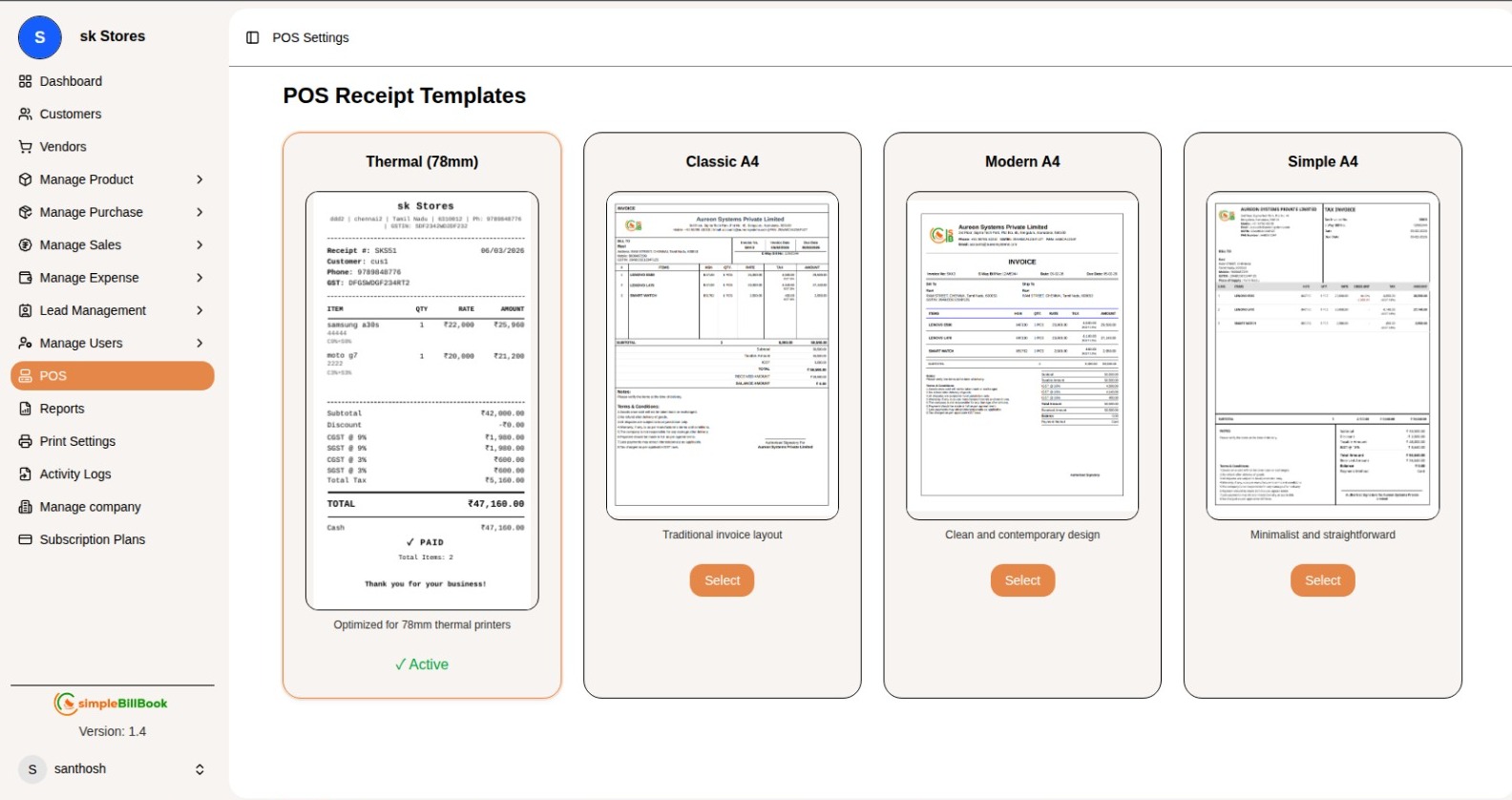 படம் 2: POS receipt template configuration options
Available Templates
1. Thermal (78mm)
78mm thermal printers-க்கு optimize செய்யப்பட்ட template
√ Active
2. Classic A4
பாரம்பரிய invoice layout
[Select]
3. Modern A4
சுத்தமான மற்றும் நவீன design
[Select]
4. Simple A4
எளிமையான மற்றும் நேரடியான வடிவமைப்பு
[Select]
POS System பயன்படுத்துதல்
படி 1: Bill-இல் Items சேர்த்தல்
- search bar பயன்படுத்தி products-ஐ தேடவும்:
- Product name
- Item code
- Barcode scan
- items-ஐ தேர்வு செய்து bill table-இல் சேர்க்கவும்
- தேவைக்கேற்ப quantity மாற்றவும் (default: 1 PCS)
படி 2: Bill Details சரிபார்த்தல்
running total-ஐ கண்காணிக்கவும்:
- Sub Total: அனைத்து item amounts-இன் மொத்தம்
- Tax: கணக்கிடப்பட்ட tax amount
- Total Amount: tax உட்பட இறுதி bill amount
படி 3: Payment Process செய்தல்
- F4 அழுத்தவும் அல்லது received amount field-ஐ click செய்யவும்
- received amount-ஐ உள்ளிடவும் (உதாரணத்தில் ₹70160.00)
- payment method தேர்வு செய்யவும் (உதாரணத்தில் Cash)
- system தானாகவே balance amount-ஐ கணக்கிடும்
படி 4: Customer தகவல்
customer details சேர்க்கவும்:
- ஏற்கனவே உள்ள customers-இல் இருந்து தேர்வு செய்யவும் (உதாரணம்: bharath)
- customer phone number
- customer email address
படி 5: Transaction முடித்தல்
- அனைத்து items மற்றும் totals சரிபார்க்கவும்
- shortcut அழுத்தவும் அல்லது click செய்து sale-ஐ complete செய்யவும்
- active template அடிப்படையில் receipt generate செய்யப்படும்
Clear All Items
- தற்போதைய bill-இல் உள்ள அனைத்து items-ஐ அகற்ற CTRL+C shortcut பயன்படுத்தவும்
- clear செய்வதற்கு முன் confirmation prompt காட்டப்படும்
Receipt Template Configuration
Template தேர்வு செய்தல்
- கிடைக்கக்கூடிய templates-ஐ பார்வையிடவும்:
- Thermal (78mm)
- Classic A4
- Modern A4
- Simple A4
- விருப்பமான template-க்கு [Select] button-ஐ click செய்யவும்
- template active ஆகும் (√ Active indicator)
Template Features
- Thermal (78mm): thermal printers-க்கு optimize செய்யப்பட்ட template
- Classic A4: பாரம்பரிய invoice layout
- Modern A4: சுத்தமான மற்றும் நவீன design
- Simple A4: எளிமையான மற்றும் நேரடியான வடிவமைப்பு
POS Operations-க்கான சிறந்த நடைமுறைகள்
Daily Operations
- System Check: printer மற்றும் barcode scanner சரியாக செயல்படுகிறதா என்பதை சரிபார்க்கவும்
- Price Verification: process செய்வதற்கு முன் prices சரிபார்க்கவும்
- Customer Information: records-க்காக customer details சேகரிக்கவும்
- Payment Confirmation: transaction complete செய்வதற்கு முன் received amount சரிபார்க்கவும்
Inventory Management
- Stock Levels: items விற்பனை செய்யப்பட்டபோது inventory கண்காணிக்கவும்
- Low Stock Alerts: குறைந்த stock-க்கு notifications அமைக்கவும்
- Product Updates: item codes மற்றும் prices update செய்யப்பட்டுள்ளதா என்பதை உறுதி செய்யவும்
Customer Service
- Quick Search: வேகமான checkout-க்கு barcode scanning பயன்படுத்தவும்
- Accurate Billing: quantity மற்றும் prices-ஐ இருமுறை சரிபார்க்கவும்
- Clear Communication: customers-க்கு total amount தெரிவிக்கவும்
- Receipts: printed அல்லது digital receipts வழங்கவும்
Keyboard Shortcuts
| Shortcut | Function |
|---|---|
| F4 | received amount process செய்ய |
| CTRL+C | அனைத்து items-ஐ clear செய்ய |
மற்ற Modules உடன் Integration
Inventory Management
- ஒவ்வொரு sale-க்கும் பிறகு real-time stock updates
- sales அடிப்படையில் low stock alerts
Customer Management
- customer profiles-க்கு sales link செய்தல்
- purchase history உருவாக்குதல்
- customer contact information சேமித்தல்
Sales Reporting
- daily sales reports
- payment method analysis
- popular product tracking
Tax Calculation
- automatic tax computation
- receipts-இல் tax breakdown
- tax regulations உடன் இணக்கம்
பொதுவான சூழல்கள் மற்றும் தீர்வுகள்
Scenario 1: தவறான Item Scan செய்யப்பட்டது
Solution:
- bill table-இல் item-ஐ கண்டுபிடிக்கவும்
- quantity-ஐ 0 ஆக மாற்றவும் அல்லது item remove செய்யவும்
- சரியான item scan செய்யவும்
- updated totals சரிபார்க்கவும்
Scenario 2: Customer Split Payment செய்ய விரும்புகிறார்
Solution:
- முதல் payment method மூலம் partial payment process செய்யவும்
- மீதமுள்ள balance-ஐ பதிவு செய்யவும்
- இரண்டாவது payment method மூலம் complete செய்யவும்
- total bill amount-உடன் பொருந்துகிறதா என்பதை உறுதி செய்யவும்
Scenario 3: Printer பிரச்சினைகள்
Solution:
- printer connection சரிபார்க்கவும்
- paper supply இருப்பதை உறுதி செய்யவும்
- தேவையெனில் alternative template தேர்வு செய்யவும்
- backup ஆக email receipt பயன்படுத்தவும்
Scenario 4: Price Discrepancy
Solution:
- product master data சரிபார்க்கவும்
- active discounts உள்ளதா பார்க்கவும்
- தேவையெனில் manager-உடன் உறுதி செய்யவும்
- அனுமதி இருந்தால் price-ஐ manually adjust செய்யவும்
முடிவு
simpleBillBook POS system வழங்குவது:
- Fast Checkout: விரைவான item lookup மற்றும் billing
- Multiple Templates: பல்வேறு printers-க்கு receipt formats
- Customer Management: customer profiles-க்கு sales link செய்தல்
- Payment Processing: பல payment methods-க்கு support
- Inventory Integration: real-time stock updates
- Tax Calculation: automatic tax computation
- Keyboard Shortcuts: F4 மற்றும் CTRL+C மூலம் வேகமான செயல்பாடு